If parts of StudioTax appear cut off, too small, or otherwise difficult to read, the issue is usually related to your Windows display resolution or scaling settings.
Fix: Set Your Display to the Recommended Resolution
Windows works best when your display is set to its native (recommended) resolution. To change it:
- Right-click on your desktop and select Display settings.
- Scroll to Display resolution and select the option marked (Recommended).
- Click Keep changes.
For step-by-step instructions, see the Microsoft Support article: Change your screen resolution and layout in Windows
T-Slips Displaying Incorrectly?
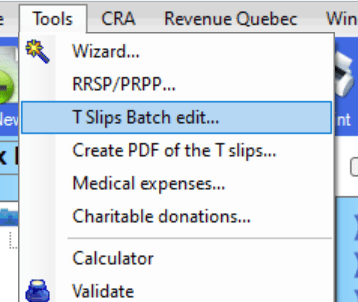
If the display issue only affects the T-slips section, you can work around it by using the Tslips Batch Edit view instead. This view presents your T-slip data in a more compact, table-based layout that is easier to navigate regardless of resolution.
Access it from the menu: Tslips > Tslips Batch Edit