CRA NETFILE Error 2197 – Unused RRSP Contributions
Error Message
When filing your return, the CRA may return the following error:
2197: Please verify the following lines found on Schedule 7:
- Make sure to enter the amount of unused RRSP/PRPP contributions available for the current year on line 1 of Schedule 7. According to CRA records, this amount is $0. If this amount is incorrect, please call the Canada Revenue Agency’s Individual Tax Enquiries line.
- Make sure to enter the total of the RRSP/SPP/PRPP contributions made after the first 60 days of the tax year and no later than the first 60 days of the following year, on line 24500 of Schedule 7.
- If applicable, make sure any contributions you are designating as a repayment under the Home Buyers’ Plan (HBP) and/or the Lifelong Learning Plan (LLP) are correctly indicated on line 24600 and/or 24620 of Schedule 7.
What This Means
This error means that the return is claiming unused RRSP contributions carried forward from previous years, but CRA’s records show $0 in unused RRSP room for this taxpayer.
This can also be triggered by an incorrect carryforward of unused RRSP contributions amount entered in the RRSP/PRPP/HBP/LLP tool. If the amount you entered does not match what CRA has on file, the return will be rejected with error 2197.
How to Fix It
Step 1 — Check your Notice of Assessment (NOA)
Look at the most recent NOA from CRA. It will show the unused RRSP/PRPP contribution room available for the current year.
Step 2 — Compare with what was entered in StudioTax
-
If the NOA shows a non-zero amount that matches what was entered in the software, the discrepancy is on CRA’s side. Call the CRA Individual Tax Enquiries line to have them correct their records before refiling.
-
If the NOA shows $0, the entry in StudioTax needs to be corrected. Open the RRSP/PRPP/HBP/LLP window in StudioTax and remove the unused RRSP contribution amount that was entered. Once cleared, refile the return.
Example: Incorrect Carryforward Amount
Here is a concrete example of how this error can occur.
Step 1 — You enter an incorrect carryforward amount in the RRSP tool
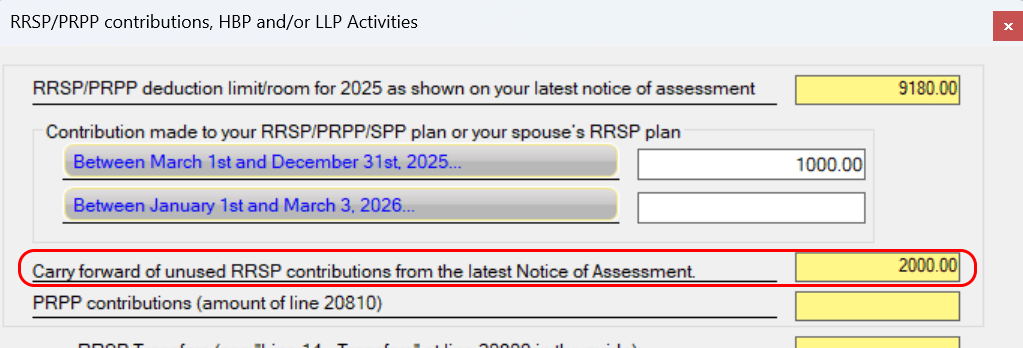
In the RRSP/PRPP/HBP/LLP tool, you enter $2,000 as the carryforward of unused RRSP contributions:
Step 2 — You receive error 2197 when transmitting to CRA
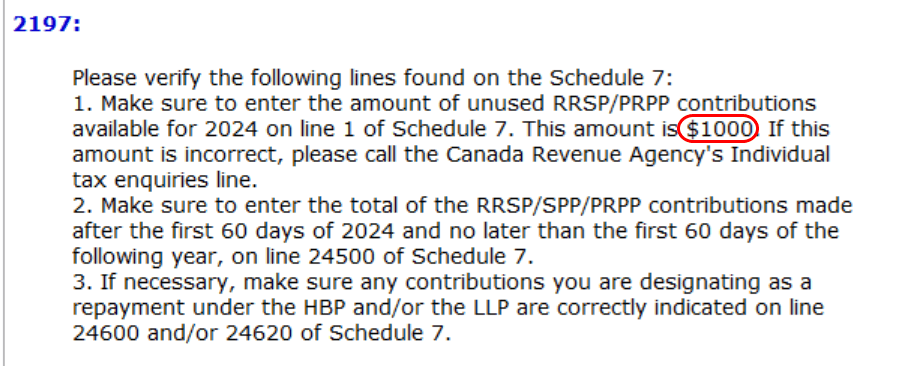
When you try to NETFILE the return, CRA rejects it with error 2197 because their records do not match the $2,000 you entered:
Step 3 — Fix the carryforward amount in the RRSP tool
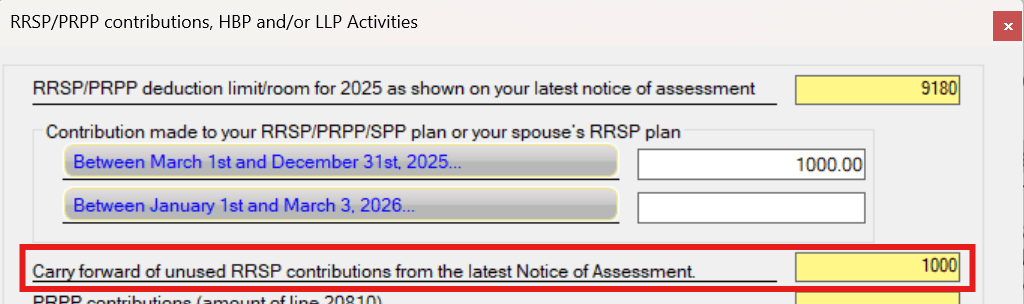
Go back to the RRSP/PRPP/HBP/LLP tool and update the carryforward of unused RRSP contributions to match the amount shown in the error message (i.e., the amount CRA expects):