Short answer: When filing through CRA NETFILE, you do not physically sign your return.
How a return is “signed” with NETFILE
When you transmit your T1 return using NETFILE-certified software like StudioTax, the CRA treats your submission as electronically certified — no handwritten or digital signature is required or accepted.
What replaces your signature
By submitting through NETFILE, you are electronically certifying that:
- the information in your return is complete and accurate, and
- you are authorizing the CRA to process the return.
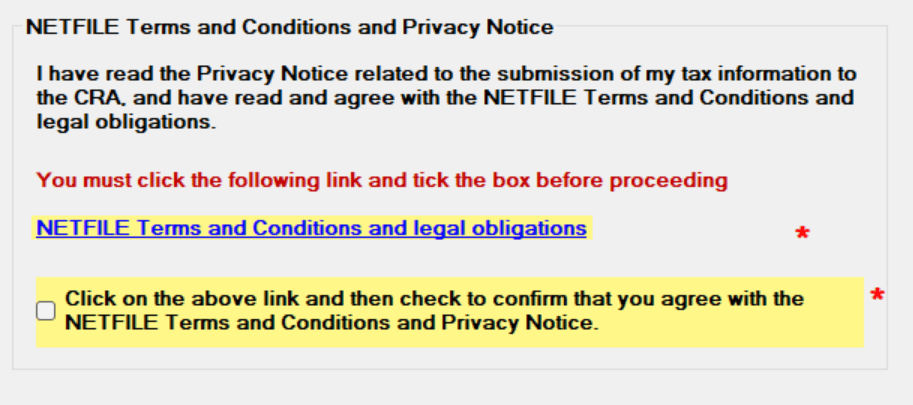
This certification happens automatically when you:
- Agree to the NETFILE Terms and Conditions and Privacy Notice in the NETFILE wizard within the software:
- Successfully transmit your return.
What you should do before transmitting
Here are a few things worth keeping after you file.
Recommended steps:
-
Keep your StudioTax return file and its backup — StudioTax saves your return as a
.xxtfile (e.g.,.25tfor a 2025 return,.24tfor a 2024 return, and so on). A backup file is also created alongside it (e.g.,.25t.backup,.24t.backup). Both files can be used to reopen your return in StudioTax at any time. Ideally, keep a copy of these files in a safe location such as an external drive or cloud storage. See Cannot Find My Return if you need help locating these files. -
Transmit your return via NETFILE — the CRA confirmation number you receive is your proof of filing. You can always retrieve it from the Filing History menu (Tools → Show Filing History).
The CRA may request these records in the event of a review or audit.
Important reminders
- Do not mail a signed return after filing via NETFILE.
- Do not upload or attach a signed form.
- Keep your
.xxtreturn file and its.xxt.backup— they let you reopen your return in StudioTax at any time. - Your confirmation number = proof of filing.
One exception: paper filing
A physical signature is only required if you file by paper mail. Once you file through NETFILE, the electronic certification fully replaces the signature requirement.
Summary
| Method | Signature required? |
|---|---|
| NETFILE (electronic) | No — electronic certification replaces it |
| Paper mail | Yes — physical signature required |
When filing through NETFILE, submitting the return certifies it electronically. Keep your StudioTax return files for your records.